

A typical leadership development course takes 130 to 150 hours to build. That’s nearly a month of full-time work for a single program. Meanwhile, your stakeholders want customized content for new managers, senior leaders, and three different business units, and they want it by next quarter.
According to a McKinsey survey, only 11% of business leaders believe their leadership development initiatives deliver meaningful results. The problem isn’t always content quality. It’s that L&D teams can’t produce enough high-quality, personalized content fast enough to keep up with demand.
AI changes that math. Early adopters report cutting development time by 40 to 60% while actually increasing personalization. But the teams getting results aren’t treating AI as a magic content machine. They’re using it as an accelerant for specific stages of the development process, with human judgment guiding every decision.
A word of caution before we start: L&D course creation is deeply human work. AI is your co-pilot, not your replacement. Especially for leadership training, where emotional intelligence, organizational culture, and real human context matter, you need a person making the judgment calls.
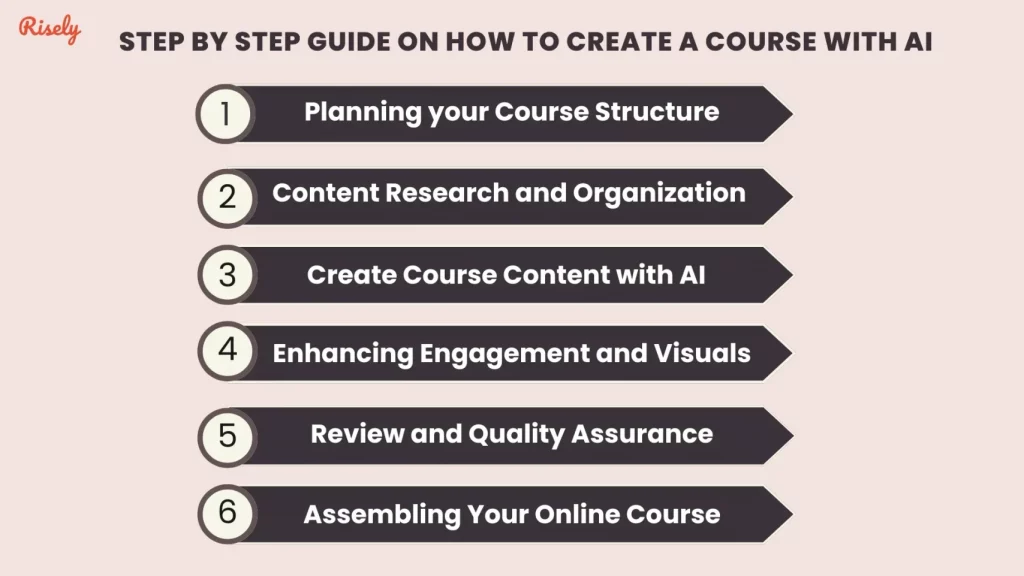
Step 1: Plan your course structure (before touching AI)
AI is terrible at defining strategy. It’s excellent at executing within a strategy you’ve defined. That’s why planning comes first, and it stays human.
Define clear learning objectives. What should someone be able to do after completing this course that they can’t do now? Frame objectives as behaviors, not knowledge. “Deliver constructive feedback using the SBI framework” is a better objective than “Understand feedback techniques.” Set SMART goals that align with your organization’s leadership competencies.
Create a content outline. Build the skeleton that AI will flesh out. Define your modules, the key concepts in each, and how they connect. This outline reflects your instructional design expertise and your understanding of your audience. AI can expand on it, but it shouldn’t define it.
Determine success metrics. How will you know if the course works? Whether it’s engagement rates, learner performance, manager-observed behavior change, or feedback scores, define these before you build. You’ll use AI to help track them, but you need to decide what matters.
Quick tip: Break learning objectives into smaller milestones. AI tools can track progress against these milestones and flag areas where learners struggle, letting you adjust content in real time.
Step 2: Use AI for research and content organization
This is where AI saves the most time. Research that used to take days can happen in hours.
Gathering current research. Tools like Claude or ChatGPT can summarize the latest thinking on leadership topics. Ask for specific, contextual information: “What are the top three challenges first-time engineering managers face when giving performance feedback?” beats “Tell me about leadership.” Perplexity is useful for pulling in recent studies with citations.
Organizing findings. AI-powered tools like Miro’s AI features help you map research into logical modules. You can visualize connections between concepts, case studies, and learning objectives, giving your course structure more clarity before you write a single word of content.
Understanding your learners. Tools like Elicit can help you create and analyze surveys to understand what your audience actually needs. AI can synthesize responses and spot patterns, but you make the call on what to prioritize.
Summarizing dense research. Academic papers on leadership development can be impenetrable. AI tools summarize complex findings into practical takeaways you can weave into course content. Use this to build evidence-based content without spending hours decoding journal articles.
Platforms like Risely, an AI-powered coaching platform, can also provide insights into common skill gaps across manager populations, helping you focus course content on the areas where learners need the most support.
Quick tip: Use AI as a research assistant, not a source of truth. Input prompts like “What are the top leadership challenges for 2026?” to gather relevant starting points, then verify claims against original research before including them in your course.
Step 3: Generate and personalize course content
This is where AI’s speed becomes obvious, but where quality risks are highest.
The power of AI for content creation is personalization at scale. Instead of one generic leadership program, you can create role-specific versions efficiently:
Marketing managers need case studies about leading creative teams, handling cross-functional conflicts, and adapting to shifting market conditions. Tech managers need scenarios about agile leadership, managing remote engineering teams, and balancing speed with quality. Operations managers need content on process optimization, crisis management, and supply chain leadership.
AI generates these variations from a single content framework, adapting tone, complexity, and real-world context for each audience. What used to require separate development tracks now branches from one course structure.
Which AI tools work best for content creation?
ChatGPT (OpenAI): Strong at generating leadership scenarios, discussion questions, and case studies. Best for quick ideation and “what if” scenarios.
Claude (Anthropic): Better for longer, more nuanced content that requires balanced perspectives. Produces fewer factual errors on complex topics.
How to get better output from AI
The quality of your results depends entirely on your prompts. Compare these two approaches:
Weak prompt: “Write about leadership.” This is too broad. No target audience, tone, length, or format specified. You’ll get generic filler.
Strong prompt: “Act as a leadership coach. Create a 400-word module for senior executives on inspiring innovation while maintaining ethical standards. The tone should be authoritative but approachable. Include one real-world example of successful leadership in this area.” This specifies audience, length, tone, format, and content type. The output will be dramatically more useful.
Three prompting patterns that work well:
- Role-based: “Act as an executive coach explaining how to deliver difficult feedback to a high-performer”
- Context-specific: “Create content for new engineering managers transitioning from technical roles to leadership”
- Format-specific: “Generate a 10-minute interactive exercise on delegation skills with facilitator instructions”
Pitfalls to watch for
Factual accuracy. AI sometimes generates plausible-sounding information that’s wrong. Verify every statistic, citation, and specific claim before it goes into your course.
Hidden bias. AI models can default to depicting only certain demographics in leadership roles or assume Western corporate norms. Review content deliberately for inclusivity and diversity.
Engagement gaps. AI produces text quickly, but not always engagingly. Your course needs interactive elements (quizzes, exercises, discussions) that AI alone won’t create well. Add these manually.
Step 4: Add engagement and visual elements
By now, you’ve got solid content. But content alone doesn’t create learning. Engagement does.
AI-powered tools can help create visuals, branching scenarios, and interactive elements. But the key is matching the right medium to the right learning moment. A video explanation works for emotional content (like why feedback matters). An interactive scenario works for skill practice (like actually giving feedback). A simple text summary works for reference material.
Don’t add visuals for decoration. Every interactive element should serve a specific learning objective. A branching scenario where learners choose how to respond to a struggling team member is valuable. A generic AI-generated infographic restating what the text already says is not.
Quick tip: Instead of using AI-generated content as-is, personalize it. Adjust case studies to your industry, tweak wording to match your organizational voice, and add real context from your company. AI writes the first draft. You make it yours.
Step 5: Review, refine, and quality-check
AI generates content fast. It doesn’t generate content accurately or inclusively by default. This step is where your expertise matters most.
Build a content checklist. Before anything goes to learners, verify that AI-generated insights align with current best practices and not outdated models. Check that scenarios reflect your organization’s values and culture. Confirm that all statistics come from credible, current sources.
Watch for hidden bias. Review whether AI has defaulted to specific demographics in leadership examples. Check that scenarios reflect diverse cultural approaches, especially for multinational organizations. Establish a diverse review panel if possible.
Pilot before you launch. Test with a small group and ask specific questions: “Does this scenario feel realistic?” “Would this example make sense in our context?” “What’s missing?” Learner feedback at this stage is worth more than any amount of internal review.
Step 6: Assemble and deliver
You’ve structured the course, refined content, and added engaging elements. Now bring it together using a delivery platform:
Articulate 360 uses an AI Content Generator to create interactive courses from prompts and tracks completion and decision paths.
Docebo Learning Suite offers AI-driven content recommendations and creates individualized development plans aligned with leadership competency frameworks.
Beyond courses: why AI coaching fills the practice gap
Traditional leadership courses face a fundamental challenge: they teach skills that can only be mastered through practice. Research shows that without immediate application and reinforcement, 90% of content is forgotten within a week.
AI-powered coaching bridges this gap in ways static courses can’t:
Just-in-time support. An AI coach is available when a manager is about to have a tough conversation, not three weeks later in the next workshop session. It helps structure the conversation, anticipate reactions, and practice responses.
Personalized guidance. AI coaching adapts to each leader’s context and challenges, analyzing communication patterns and recommending approaches based on team dynamics.
Safe practice. Leaders can rehearse difficult scenarios (performance reviews, conflict resolution, organizational change) without real-world consequences. Try Merlin, the AI coach at Risely for personalized leadership coaching that complements any course you build.
Consistent reinforcement. Micro-learning nudges reinforce key concepts between sessions. Pattern recognition identifies areas for improvement over time. Progress tracking shows development milestones.
The most effective L&D strategies combine structured courses for foundational knowledge with AI coaching for ongoing practice and application. The course teaches the skill. The coach helps you use it.
Common challenges and how to handle them
Maintaining authenticity. Create an AI-human workflow where AI generates initial drafts and experienced leaders add personal anecdotes and organizational context. Use “voice calibration prompts” that incorporate your company’s values.
Cultural sensitivity. Develop regionally-specific content guidelines. Use diversity prompting: “Create leadership scenarios reflecting diverse cultural approaches to conflict resolution across Asian, European, and Latin American contexts.”
Leadership buy-in. Start with a pilot project that demonstrates concrete results. Present data comparing AI-assisted development time vs. traditional timelines. Show, don’t tell.
Digital literacy gaps. Offer hands-on workshops where employees interact with AI tools in practical scenarios. Use peer champions within the organization who can mentor others through the learning curve.
AI doesn’t replace the L&D professional. It removes the bottleneck of production so you can focus on what you do best: designing learning experiences that actually change how people work.